













USVisaScheduling - Access Limitation due to violation of Prohibited Conduct





Facing issues while trying to book your US visa slots? Do you also see an “Access Limitation” pop-up on your screen? A lot of us have been facing the same issue. But don’t worry; we can explain why this is happening and what you can do to avoid being stuck on the page and missing an opening.
What is the “Access Limitation” pop-up?
Go to the Terms and Conditions page of the USTravelDocs and check the updated version of the prohibited conduct. It mentions that this “Access Limitation” might be due to the presence of any plug-ins or extensions on your device. This step has been taken to keep the visa slot booking process fair and ensure that you check your visa slots by yourself.
%20(1).jpg)
How can you avoid this issue?
To avoid this problem, here are a few tips and tricks to help resolve this issue:
1. Try uninstalling and removing all extensions from your browser. Avoid using VPNs, too.
2. Try disabling the tracker/tracking protection from your device.
3. To book slots, try opening a new browser on your device, such as Safari, Microsoft Edge, Opera, or Firefox.
4. If the issue persists, you can delete the cookies and clear any cache left from your browser.
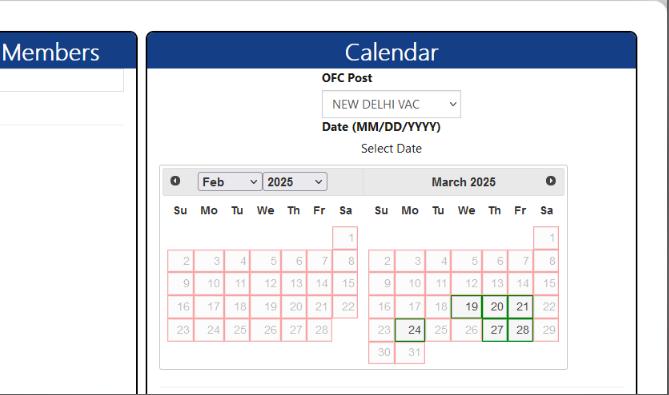
Here is an image for your reference showing slots opened on Firefox. Remember, following these guidelines ensures a smoother experience when booking your US visa slots. Stay patient and vigilant, and you'll secure your appointment quickly. Good Luck, guys!
Frequently Asked Questions!

It is not recommended to use another person's account to book your visa slot as it may violate USTravelDocs policies. Always use your own account to avoid further complications.

Avoid using browser extensions, VPNs, and multiple accounts simultaneously. Ensure all information is accurate and up-to-date before attempting to book a slot.
Using a VPN is not recommended as it can trigger security measures on the site, potentially leading to account suspension. It's best to book slots from a stable and recognized IP address.
High demand and prioritization of other visa categories, such as student and work visas, often lead to limited availability for business/tourism visas. The latest available dates are sometimes pushed far into the future.
Using multiple devices can increase your chances, but ensure each device is free of extensions. Be cautious of triggering security measures that might lead to an account ban.
Contact USTravelDocs support to inquire about the reason for the permanent ban and possible steps for appeal. Provide any necessary documentation or explanation to support your case.